Guide · 9 min read · Updated August 29, 2026
How to Make a Vox Style Video: The Full Documentary Collage Prompt Pack
A Vox style video runs on a look you already know: halftone cutouts, redacted eyes, archival maps and one hot red accent on aged paper. Getting that look on a single frame is easy. Getting it on every scene of a 60 second short, cut to a narration, is the hard part. This page gives you the three prompts that produced the example short in this guide, copied verbatim, plus the six reference images and the exact settings behind them.
What you need
- A free Calliope account at https://calliopelabs.co
- The six reference images further down this page. Right click and save each one, since the web version has no PDF to drag them out of.
- The three prompts on this page: the Master Agent Prompt, the Image Prompt and the Video Prompt.
- A topic. If you do not have one, the agent will propose three documentary hooks that open with a number or a date.
1. Grab the reference images
The prompts describe the style. The references prove it. Words like "archival tan" or "torn paper edge" mean twenty different things until an actual image pins them down, and a Project Template that carries both text and pictures locks the style far tighter than text alone. Six images are enough: one master sheet and five shot examples covering the situations a documentary collage explainer keeps running into.
Save all six now. You will attach them in step 2, in a single chat message, next to the two style prompts.
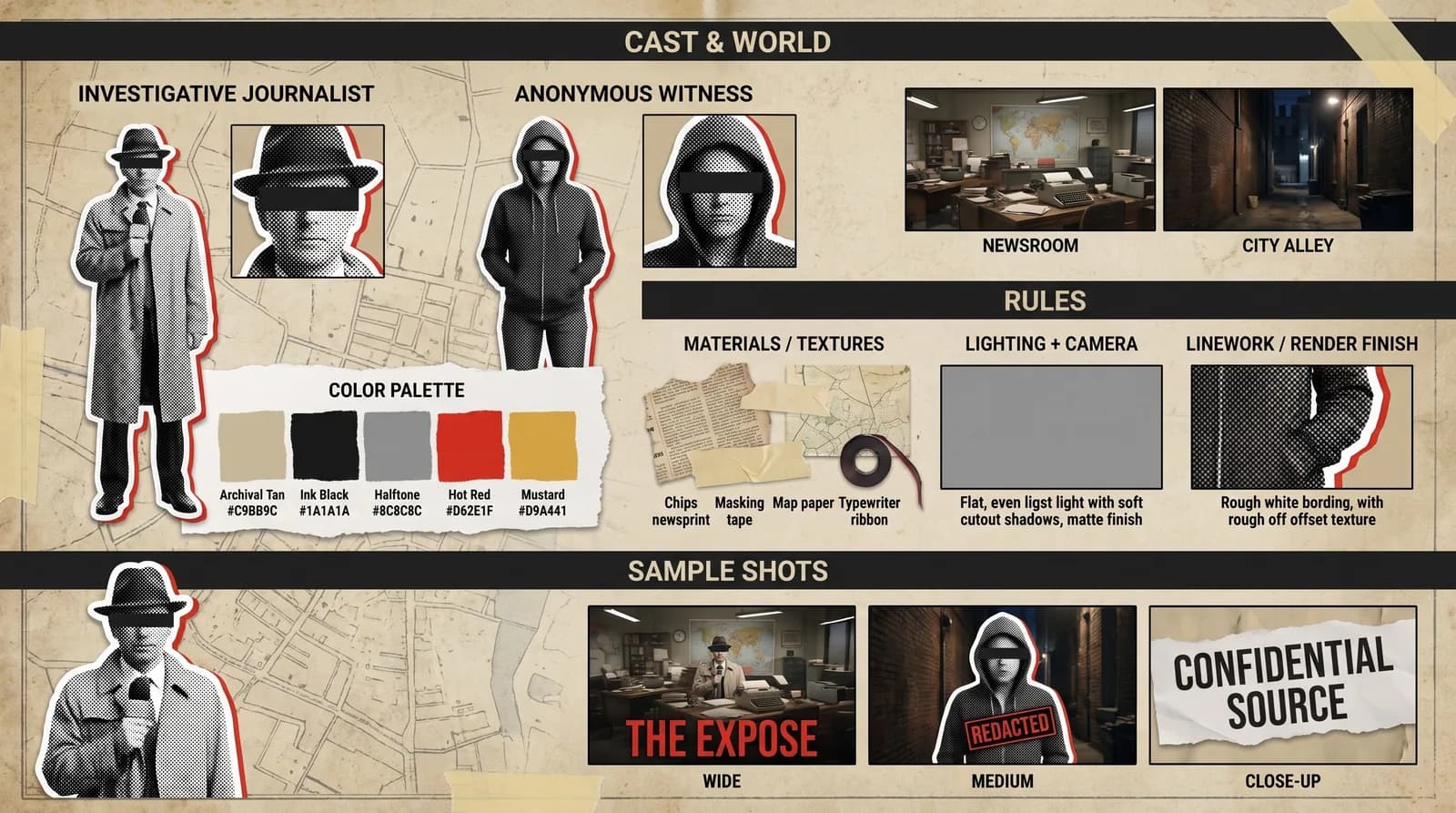
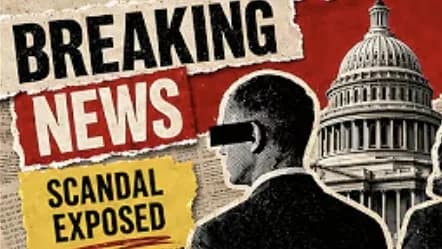
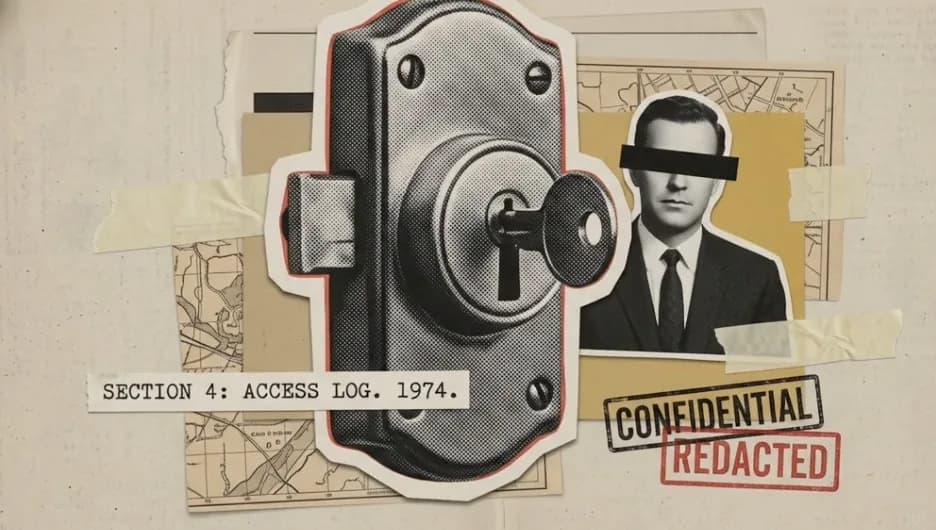
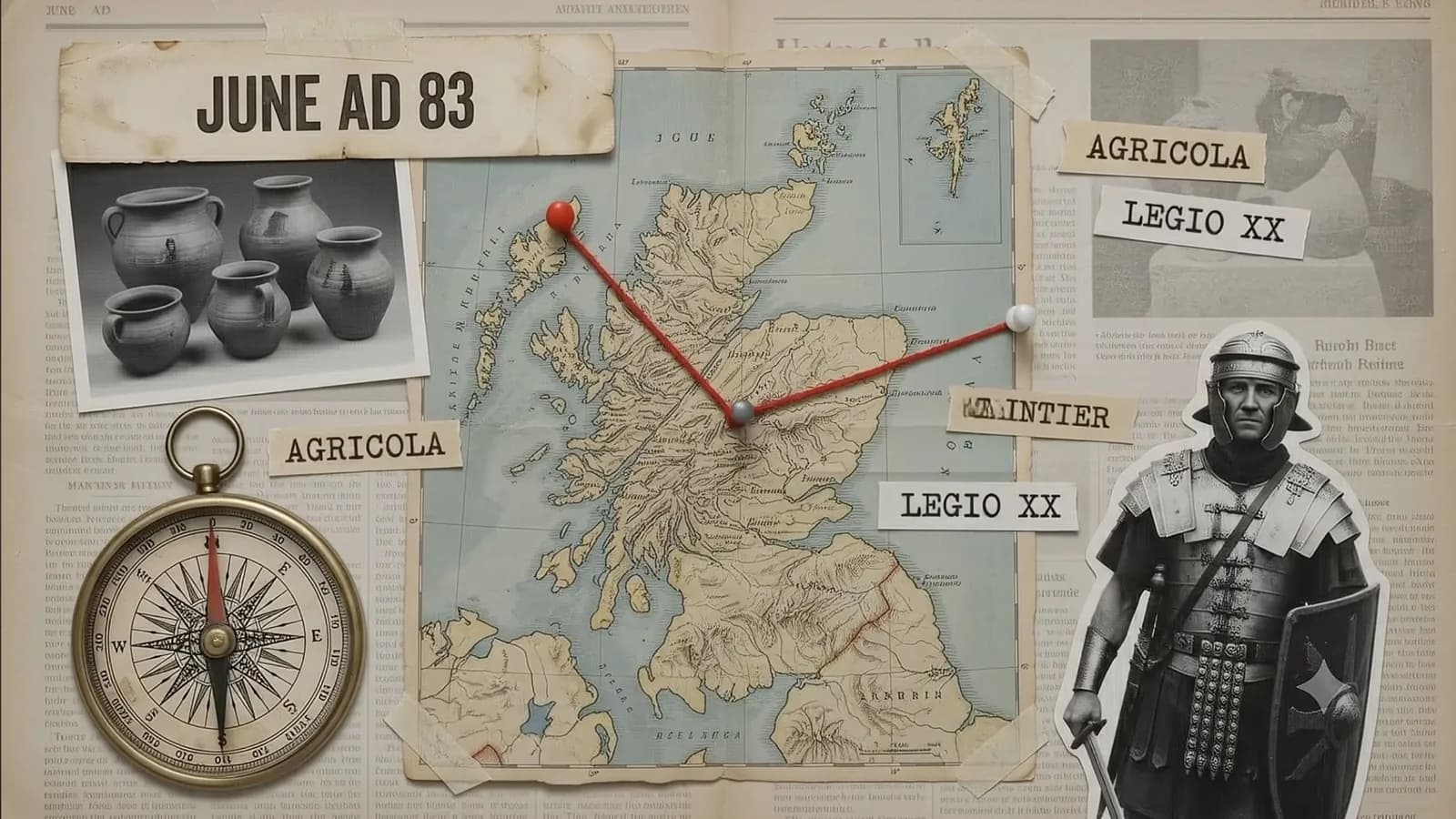
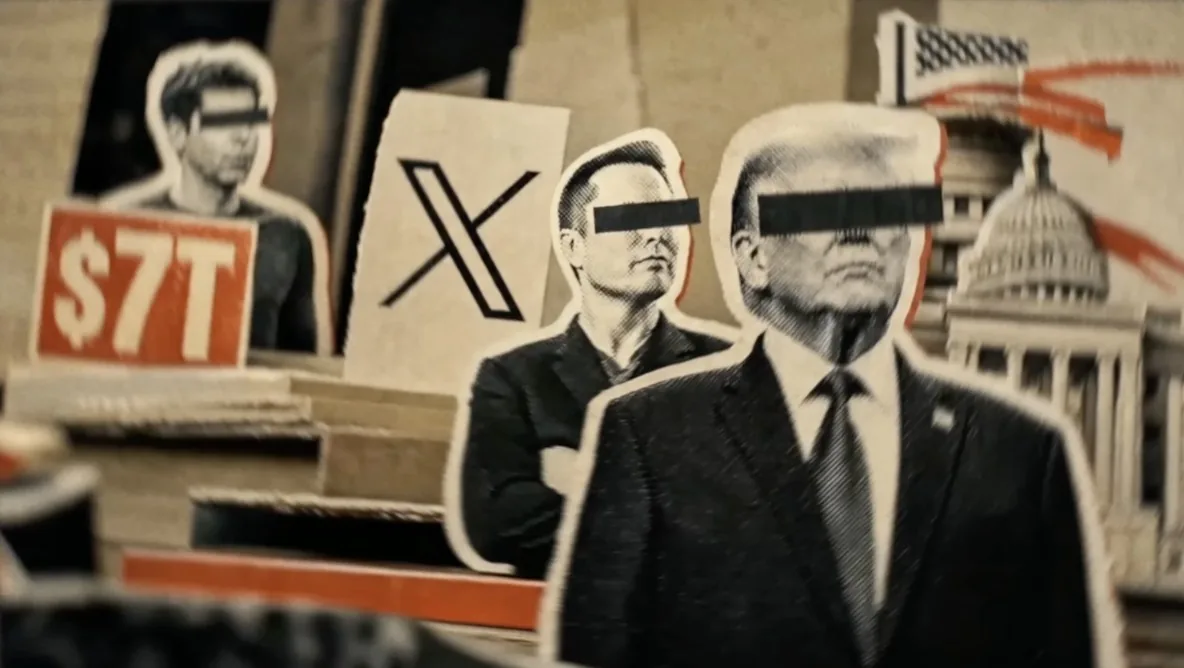
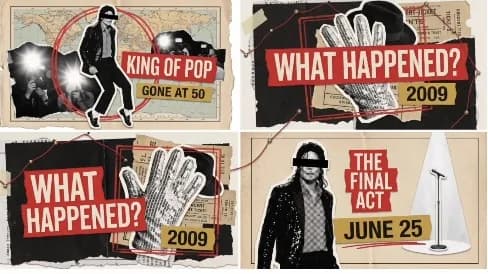
The references are the part people skip, and it is the part that decides whether scene 9 still looks like scene 1. A prompt sets intent. A reference sets the ceiling.
2. Build the template
Everything lives in one place: your Project Template, in the Visuals Lab. You are teaching Calliope one stage, one palette and one set of physics, so that every clip it generates later belongs to the same short.
- Paste the Image Prompt and the Video Prompt into the chat and attach the six references in the same message.
- Set it up: Shorts, narrator on, animated on, image Extra High, video High.
- Check the Visual References panel shows all six, then save the Shorts template.
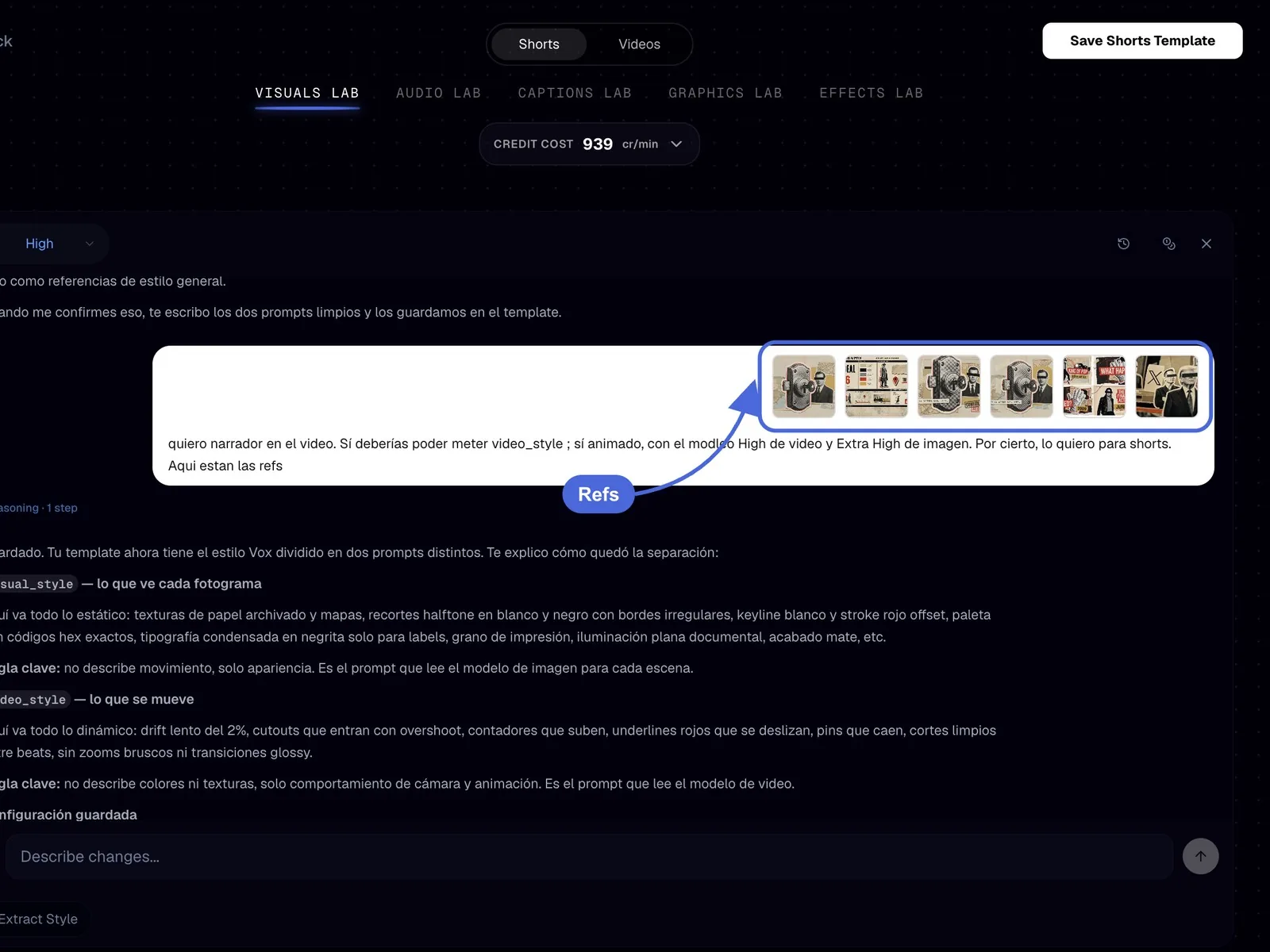
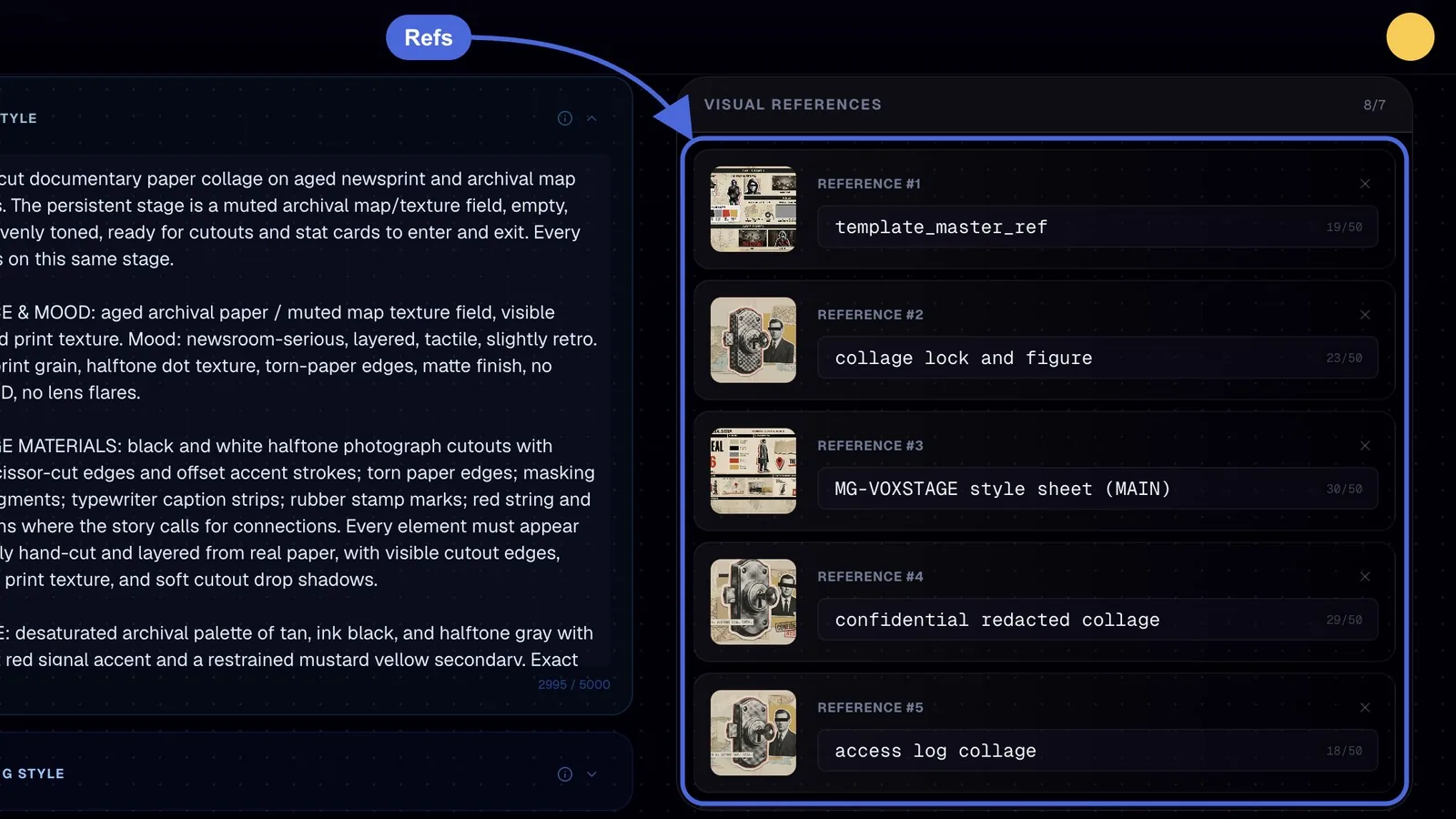
Keep the two prompts in separate fields. The Image Prompt goes to visual_style and describes surfaces, palette, typography and prohibitions. The Video Prompt goes to video_style and describes camera, entrances, rhythm and transitions. Mixing them is the single most common reason a documentary collage video comes out flat: color instructions inside the motion field get ignored, and motion instructions inside the style field bake fake blur into stills.
Or skip all of this. The Master Agent Prompt in Part 1 does every one of these three sub-steps for you, in one paste.
Part 1. The Master Agent Prompt
This is the shortcut. Paste it into your Claude with the Calliope MCP connected, attach the six references, then paste the Image Prompt and the Video Prompt right after it. From there the agent builds the Project Template, writes a timestamped storyboard, quotes you the exact cost and waits. It asks you two questions total: your topic, and a yes on the price.
Copy it as is. The instructions at the end matter as much as the ones at the start: never modify the two prompts, never swap quality settings, never render without confirmation.
You are my Calliope video producer. Use the Calliope MCP tools end to end. Ask me only two things: the topic, and a yes on the cost. Everything else is decided below.

1. TEMPLATE. Read chat-style/create-video-best-practices and image-style/IMAGE-STYLE-CREATOR via read_skill. Then call create_template with content_type "short", name "Vox Documentary Collage", description "Hand-cut documentary paper collage explainers, Vox style". Upload the 6 reference images I attached with register_upload and pass them as source.visual_references. Put the IMAGE PROMPT I paste next into source.visual_style and the VIDEO PROMPT into video_style, both verbatim, no rewriting, no shortening. Settings: voiceover true, animate true, captions true, custom quality with image "extra" and video "high". Do not add scripting_style.

2. BRIEF. Ask me for the topic. If I have none, propose 3 documentary hooks that open with a number or a date. Write content_instructions as a timestamped storyboard for a 45 to 60 second short: a hook stat in the first 2 seconds, one idea per beat, one red-accent element per scene, narrator only, no on-screen dialogue. Every scene must fit the collage stage: cutouts, stat cards, map pins, paper strips. Public figures get the black eye bar.

3. PRICE. Call estimate_generation_cost with target_duration_sec 60 on that template and show me the exact number. Wait for my yes.

4. GENERATE. create_video, content_type "short", source.template_id, auto_accept false. Poll get_job every 60 seconds and stop between polls. Show me the character reference sheet (character_reference, then get_clip sheet_index 0) before resuming; resume_job to assets, then to render.

5. DELIVER. When Completed, give me the video, then create 3 thumbnails with the closest thumbnail style. Never modify my two prompts. Never pick other models. Never render without my confirmation.
Part 2. The Image Prompt
This is visual_style: what every frame looks like, with no motion in it. The important idea is the persistent stage. Instead of describing nine unrelated pictures, it describes one muted archival map surface that every clip lives on, so cutouts and stat cards feel like they enter and exit the same tabletop. It also fixes exact swatches, which is what stops the palette from drifting warm halfway through the short, and it ends with a hard prohibitions list, because a Vox style video dies the moment it looks glossy and smooth.
A hand-cut documentary paper collage on aged newsprint and archival map surfaces. The persistent stage is a muted archival map/texture field, empty, pre-lit, evenly toned, ready for cutouts and stat cards to enter and exit. Every clip lives on this same stage.

SURFACE & MOOD: aged archival paper / muted map texture field, visible grain and print texture. Mood: newsroom-serious, layered, tactile, slightly retro. Finish: print grain, halftone dot texture, torn-paper edges, matte finish, no glossy 3D, no lens flares.

COLLAGE MATERIALS: black and white halftone photograph cutouts with rough scissor-cut edges and offset accent strokes; torn paper edges; masking tape fragments; typewriter caption strips; rubber stamp marks; red string and brass pins where the story calls for connections. Every element must appear physically hand-cut and layered from real paper, with visible cutout edges, halftone print texture, and soft cutout drop shadows.

PALETTE: desaturated archival palette of tan, ink black, and halftone gray with ONE hot red signal accent and a restrained mustard yellow secondary. Exact swatches: Archival Tan #C9BB9C, Ink Black #1A1A1A, Halftone Gray #8C8C8C, Hot Red #D62E1F, Mustard #D9A441. Red is reserved for strokes, underlines, arrows, stat counters and emphasis; mustard is secondary accent only.

TYPOGRAPHY: condensed bold headline caps only where a label is specified. H1 headlines are huge and dominant. Stat numbers like "$116" are treated as hero characters. Small annotation labels like "Fig. 3 - Trade Route" are typewriter-style. Typography aligned, sharp, no warped letters. No watermarks, no lorem ipsum, no unrelated logos, no random gibberish text : every visible word must be intentional.

COMPOSITION RULES: one hero element (dominant, about 70 percent of visual weight), 2-3 supporting elements maximum, generous negative space. If the beat carries a date, a name, or a number, it may appear as ONE short label of 1-4 words on a paper strip or stamp. Otherwise no text.

COMPONENT ZOO: black-and-white halftone cutouts of figures with a rough white keyline and an offset red stroke behind them; torn-paper edge cards; big red stat counter cards; map pin markers; red underline swipes beneath headline words; archival photo cards with a thin white border. All share one construction logic: halftone texture, offset stroke pop.

FIGURE TREATMENT: when depicting real public figures or anonymous subjects in documentary beats, their eyes may be censored with a solid black horizontal bar across the eyes, like a redacted identity photo. The bar is ink-black, flat, slightly rough-edged, integrated into the halftone cutout.

LIGHTING: flat even documentary lighting with soft cutout drop shadows. No dramatic chiaroscuro, no colored lights, no glossy reflections.

PROHIBITIONS: no glossy 3D, no lens flares, no gradients on cutouts, no neon, no motion blur baked into stills, no AI-looking smoothness, no unrelated logos, no lorem ipsum, no watermarks.
Part 3. The Video Prompt
This is video_style: how the clips move, with no colors in it. Every rule here is a physical rule. Cutouts spring and settle, counters tick, pins drop and wobble once, labels type on like a strip being pulled. Text never fades in transparently, because paper does not fade in. The rhythm line, cuts every 1 to 3 seconds in sync with narration beats, is what makes a paper collage explainer read as editorial rather than as a slideshow.
Editorial documentary motion for short-form explainers. The camera treats the collage stage as a physical tabletop that can be explored, not as a 3D world.

CAMERA BEHAVIOR: slow 2% drift across the stage, gentle micro-pushes in and out, subtle simulated rack focus between paper layers. Never fast zooms, never shaky cam, never spinning camera, never parallax exaggeration. The camera holds most beats with a calm, newsroom authority.

ELEMENT ENTRANCES: cutouts spring up with slight overshoot and settle; stat counters tick upward with mechanical precision; red underline swipes beneath a headline word from left to right; map pins drop and wobble once; photo cards slide in with a soft paper shuffle; torn-paper cards peel into frame. Every motion should feel like a physical paper element being manipulated by an invisible editor.

RHYTHM: cuts every 1-3 seconds in sync with narration beats. Each cut lands on a new composition or a new element entering. Pacing is brisk but never frantic. Silence beats are held on a static frame with only the slow drift.

TEXT & COUNTER MOTION: numbers count up; headline words are revealed by red underline swipes or by paper strips sliding into place; labels type on like a typewriter strip being pulled. Text never fades in transparently : it always arrives as a physical object.

TRANSITIONS: hard cuts between scenes, occasionally a paper wipe or a torn-edge reveal. No dissolves, no star wipes, no 3D transitions, no lens flares.

LAYER MOTION: foreground cutouts may shift slightly against the map background to create depth, but the background stage stays locked. Red strings and brass pins can draw themselves across the stage to connect elements when the story calls for connections.

PROHIBITIONS: no character lip-sync, no full-body character animation, no 3D camera fly-throughs, no particle effects, no glows, no speed ramps, no handheld shake.
3. Generate the short
With the template saved, the Creation Lab handles the script, the character reference sheet and the shoot. You are only approving decisions.
- Open the Creation Lab with your template selected and give it your topic, or ask the agent for one.
- Approve the character reference sheet when it comes back. It is what keeps every cutout on model from the first beat to the last.
- Hit Start Generation. The timeline lands with clips, captions, narration and SFX, all editable.
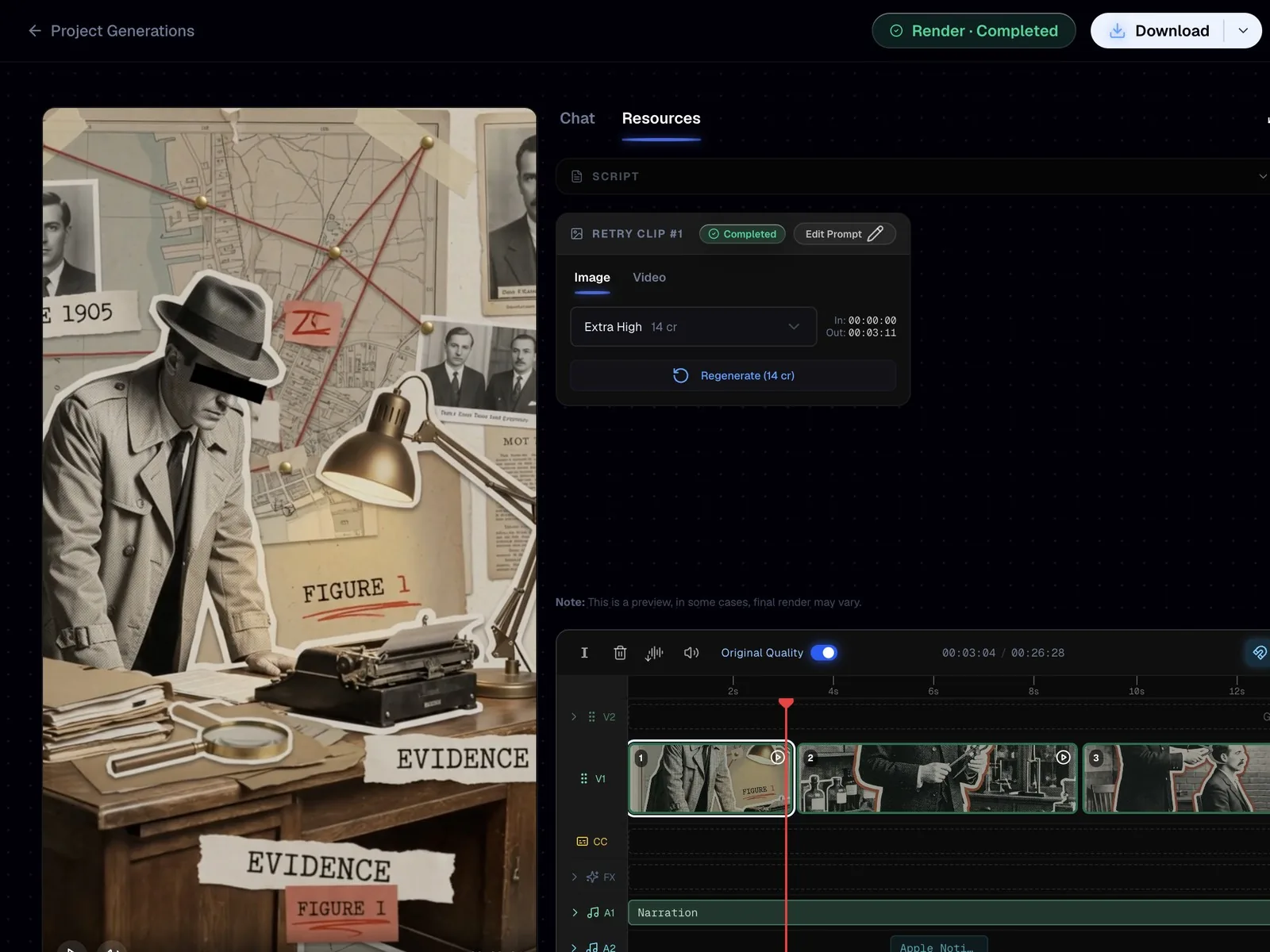
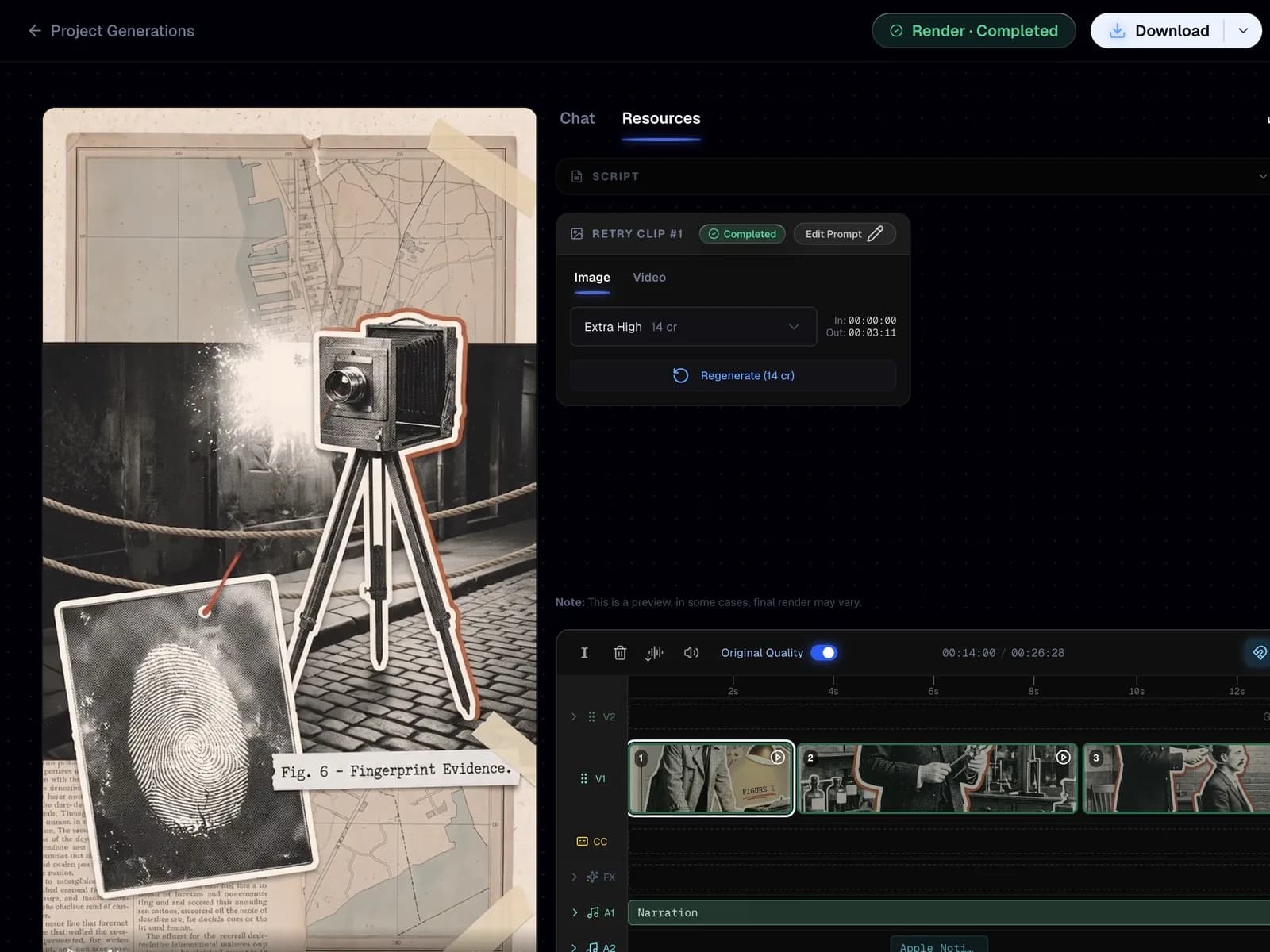
Approving the character reference sheet is not a formality. It is the last cheap moment to fix a face, a silhouette or a treatment before the whole short is generated against it.
Common mistakes
- Writing motion words like "slow push in" into the Image Prompt, which bakes fake blur into stills instead of moving the camera.
- Letting the red accent spread onto backgrounds and multiple elements, when it is reserved for strokes, underlines, arrows, stat counters and emphasis only.
- Filling frames with five or six cutouts, instead of one hero element at about 70 percent of the visual weight with two or three supporting pieces.
- Attaching the prompts but not the six references, then wondering why scene 7 looks like a different show than scene 1.
- Asking for paragraphs of on-screen text, when the style allows one short label of 1 to 4 words on a paper strip or a stamp.
FAQ
What is a Vox style video?
A Vox style video is a short documentary explainer built from hand-cut paper collage: halftone black and white cutouts, torn edges, archival maps, typewriter labels and one hot red signal accent. The camera treats the collage as a physical tabletop rather than a 3D world, drifting slowly and cutting every one to three seconds on narration beats. It is a look, not a topic, so it works for history, money, crime and geopolitics alike.
Can I make Vox style shorts without editing skills?
Yes. You paste one prompt pack into Calliope, approve the character reference sheet and press Start Generation, and the timeline comes back with clips, captions, narration and sound effects already assembled. Editing skills only help afterwards, if you want to retime a beat or swap a frame.
Why does my documentary collage video look glossy and 3D instead of hand-cut?
Because the prohibitions list is missing or was rewritten. The Image Prompt has to explicitly ban glossy 3D, lens flares, gradients on cutouts, neon and smooth finishes, and it has to demand print grain, halftone dots, torn edges and soft cutout drop shadows. Paste it verbatim rather than summarising it, and attach the reference images so there is a visual floor as well as a written one.
What settings should I use for a paper collage explainer?
Use Shorts, narrator on, animated on, image quality Extra High and video quality High. Extra High on the image side matters most here, because halftone dots, torn fibres and typewriter labels are fine detail that collapses first when image quality drops.
Make your own
Same three prompts, any topic you want, no editing timeline to learn first. Start free at https://calliopelabs.co and have your first Vox style short planned in a few minutes.
Take the whole guide with you
Vox style prompt pack (PDF, 4 pages). Same content, laid out to print or to keep on your phone while you build.
Keep reading
Make a Simpsons style video
Lock the cartoon look with a reusable character sheet prompt, turn it into a template, and let Calliope shoot the whole thing.
Make an ancient humans video
Clone the look of a video that already works, turn it into a reusable template, and generate your own 2D animated history shorts.